
What Is Technical SEO?
Technical SEO is the process of optimising the infrastructure of your website so that search engines can efficiently crawl, render, index, and rank your pages. Unlike on-page SEO (which focuses on content) or off-page SEO (which focuses on backlinks), technical SEO operates at the foundation level: the code, server configuration, site structure, and performance signals that determine whether Google and other search engines can even access and understand your site.
Think of it this way. You can write the best article on the internet, but if Googlebot cannot crawl it, users will never find it through search.
Technical SEO covers a broad range of disciplines, including:
- Crawl budget management and robots.txt configuration
- XML sitemaps and indexing signals
- Page speed and Core Web Vitals
- Structured data and schema markup
- HTTPS and secure site configuration
- Mobile-first compatibility
- Site architecture and internal linking
- Canonical tags and duplicate content management
- Hreflang for international sites
- AI crawler readiness and llms.txt
In 2026, technical SEO has expanded beyond just Google. Optimising for AI search engines like ChatGPT, Perplexity, and Google AI Overviews requires an additional layer of technical readiness called Answer Engine Optimisation (AEO) and Generative Engine Optimisation (GEO), which we cover later in this guide.
Why Technical SEO Matters
No amount of great content or link building will compensate for a site that search engines struggle to crawl and index. Technical SEO is the prerequisite for everything else in your SEO strategy.
Here is why it matters in concrete terms:
Rankings depend on crawlability. If Googlebot cannot access your pages or is blocked by a misconfigured robots.txt, those pages simply will not appear in search results. No crawl means no index. No index means no rankings.
Speed is a ranking factor. Google officially uses Core Web Vitals as a ranking signal. A slow site does not just frustrate users; it actively hurts your position in the SERPs.
Duplicate content dilutes authority. Without proper canonical tags, Google may split your link equity across multiple versions of the same page, weakening your overall ranking power.
Structured data unlocks rich results. Schema markup enables rich snippets, knowledge panels, and eligibility for AI Overview citations. Sites that skip schema miss out on significant SERP real estate.
AI engines need clean structure. As AI-powered search engines become primary traffic sources, sites that are well-structured, fast, and semantically clear are far more likely to be cited in AI-generated answers.
Technical SEO is not a one-time task. It is an ongoing discipline that requires regular auditing as your site grows and as search engine requirements evolve.
Crawlability and Indexability
Crawlability refers to how easily search engine bots can discover and navigate your website. Indexability refers to whether those pages are eligible to be stored in Google’s index and shown in search results.
A page can be crawlable but not indexable. A noindex tag, for example, allows Googlebot to visit the page but instructs it not to include the page in search results.
Key crawlability signals to audit:
Robots.txt is a plain text file at your domain root (e.g., yoursite.com/robots.txt) that gives instructions to crawlers. A misconfigured robots.txt can accidentally block Googlebot from your entire site or from specific sections. In 2026, you should also check whether your robots.txt correctly manages AI crawlers such as GPTBot, ClaudeBot, PerplexityBot, and Google-Extended.
Crawl budget is the number of pages Googlebot will crawl on your site within a given time frame. For large sites (10,000+ pages), crawl budget management is critical. Wasteful crawling of low-value pages like session ID URLs, faceted navigation pages, or duplicate parameter variations drains your crawl budget.
Internal linking is one of the most powerful crawlability levers. Pages with no internal links pointing to them (orphan pages) may never be discovered by Googlebot at all. A well-structured internal link network ensures crawl equity flows to your most important pages.
Indexability signals include the robots meta tag and the X-Robots-Tag HTTP header. Audit these to ensure important pages are not accidentally tagged noindex.
Site Architecture and URL Structure
Site architecture refers to how your pages are organised and linked together. A logical, flat architecture helps both users and search engines navigate your site efficiently.
Best practices for site architecture:
Keep important pages within 3 clicks of the homepage. Pages buried deep in the site hierarchy receive less crawl equity and are harder to rank. Flatten your structure wherever possible.
Use descriptive, keyword-rich URLs. A URL like /blog/what-is-technical-seo is both user-friendly and keyword-relevant. Avoid dynamically generated URLs with query strings like /page?id=12345 unless you have a strong canonicalisation strategy.
Avoid URL parameters creating duplicate content. Session IDs, tracking parameters, and filter combinations can generate thousands of near-duplicate URLs. Use canonical tags or URL parameter handling in Google Search Console to consolidate these.
Consistent URL structure signals authority. Pick one format (trailing slash or no trailing slash, www or non-www) and redirect all variations to the canonical version with a 301 redirect.
Page Speed and Core Web Vitals
Core Web Vitals (CWV) are Google’s set of real-world performance metrics that measure user experience. They became an official ranking factor in 2021 and have grown in importance since. Failing CWV thresholds is now a confirmed competitive disadvantage.
The three Core Web Vitals:
Largest Contentful Paint (LCP) measures how quickly the main content of a page loads. The target is under 2.5 seconds. LCP is typically impacted by slow server response times, render-blocking resources, or large unoptimised images.
Interaction to Next Paint (INP) replaced First Input Delay (FID) as of September 2024. INP measures the latency of all interactions on a page, not just the first one. The target is under 200ms. Heavy JavaScript execution is the most common culprit.
Cumulative Layout Shift (CLS) measures visual stability. The target is under 0.1. Layout shifts caused by images without declared dimensions, web fonts loading late, or dynamically injected content above the fold can trigger a poor CLS score.
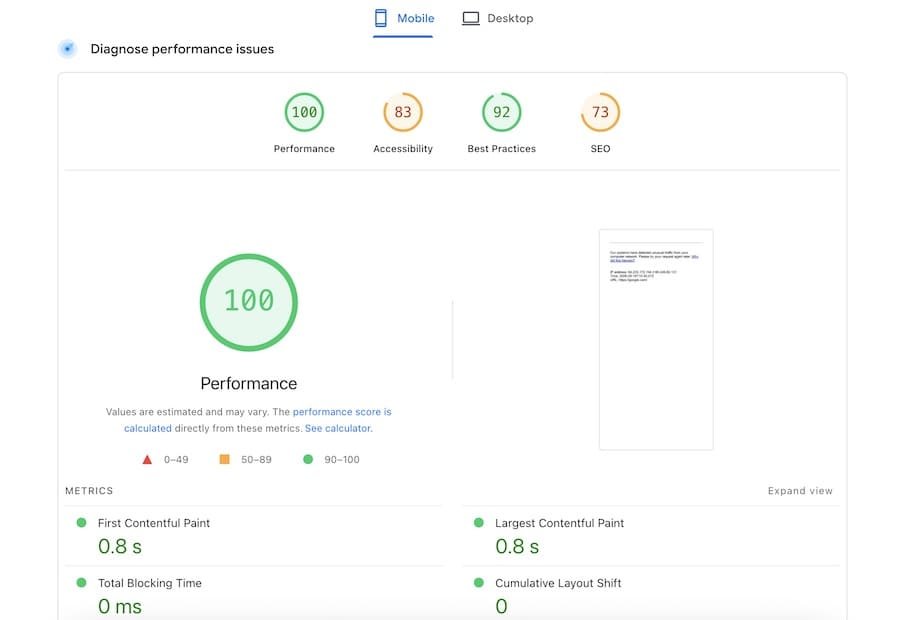
How to improve Core Web Vitals:
- Use a fast hosting provider with a CDN
- Compress and convert images to WebP or AVIF
- Defer non-critical JavaScript
- Use
font-display: swapfor web fonts - Set explicit width and height attributes on images and video elements
- Minimise third-party scripts (chat widgets, analytics, ad tags)
Mobile-First Indexing
Google completed its rollout of mobile-first indexing on July 5, 2024. This means Google now uses the mobile version of your site as the primary version for indexing and ranking, regardless of whether the user searching is on mobile or desktop.
If your mobile site is missing content that exists on your desktop site, Google will not see that content. If your mobile site is slower or harder to navigate, that directly affects your rankings.
Mobile-first technical requirements:
- Use a responsive design (not a separate
m.subdomain) - Ensure all content visible on desktop is also accessible on mobile
- Avoid interstitials that block content on mobile (this is a direct Google penalty trigger)
- Test your mobile performance separately using Google Search Console’s Mobile Usability report and PageSpeed Insights with the mobile strategy flag set.
HTTPS and Security Signals
HTTPS has been a confirmed Google ranking signal since 2014. In 2026, an HTTP site is not just a ranking disadvantage, it is a trust and conversion problem. Major browsers like Chrome label HTTP pages as “Not Secure,” which reduces click-through rates significantly.
HTTPS technical checklist:
- Serve all pages over HTTPS, including internal resources (images, scripts, fonts)
- Set up HSTS (HTTP Strict Transport Security) headers to prevent protocol downgrade attacks
- Redirect all HTTP traffic to HTTPS with 301 redirects
- Ensure your canonical URLs reference HTTPS versions
- Check for mixed content warnings (HTTP resources loaded on an HTTPS page)
Additional security headers that improve both security and SEO signal quality include X-Frame-Options, X-Content-Type-Options, and a properly configured Content-Security-Policy.
Structured Data and Schema Markup
Structured data is code added to your HTML that helps search engines understand the context and meaning of your content. Schema markup uses the vocabulary from Schema.org and is implemented using JSON-LD (the recommended format by Google).
Structured data does not directly boost rankings in most cases, but it enables rich results in the SERPs, which improve click-through rates and brand visibility. It also plays an increasingly important role in AI search citations.
Commonly used schema types for SEO content:
- Article / BlogPosting: For blog posts and news articles
- Organization: For brand identity and knowledge panel eligibility
- WebSite with SearchAction: For sitelinks search box
- BreadcrumbList: For breadcrumb rich results
- Product and Offer: For e-commerce pages
- SoftwareApplication: For SaaS and app pages
Critical schema rules (2026):
- Always use
<script type="application/ld+json">format. Never use Microdata or RDFa. - FAQPage schema is restricted to government and healthcare authority sites only (since August 2023). Do not use it on commercial sites.
- HowTo schema rich results were fully removed in September 2023. Do not implement HowTo expecting a rich snippet.
- Validate all schema using Google’s Rich Results Test before deploying.
XML Sitemaps and Robots.txt
XML Sitemaps
An XML sitemap is a file that lists all the URLs on your site you want search engines to index. It acts as a roadmap for Googlebot, particularly useful for large sites or sites with thin internal linking.
Best practices:
- Keep your sitemap under 50,000 URLs and 50MB. Use multiple sitemaps with a sitemap index file if you exceed this.
- Only include canonical, indexable URLs. Do not include
noindexpages, redirect URLs, or pages blocked by robots.txt. - Submit your sitemap via Google Search Console and Bing Webmaster Tools.
- Update your sitemap dynamically as new content is published.
Robots.txt
The robots.txt file controls which crawlers can access which parts of your site. Key rules:
- Place it at the root:
yoursite.com/robots.txt - Do not block your CSS or JavaScript files. Google needs to render your pages to evaluate them properly.
- Include your sitemap URL at the bottom of robots.txt:
Sitemap: https://yoursite.com/sitemap.xml - In 2026, explicitly decide your policy on AI crawlers. Blocking GPTBot, ClaudeBot, and PerplexityBot prevents your content from appearing in AI-generated answers.
Duplicate Content and Canonical Tags
Duplicate content occurs when substantially similar content appears on multiple URLs. This confuses search engines, splits link equity, and can lead to the wrong version of a page ranking.
Common duplicate content causes:
- HTTP vs HTTPS versions of the same page
- WWW vs non-WWW
- Trailing slash vs no trailing slash
- URL parameters (session IDs, tracking codes, filter combinations)
- Printer-friendly page versions
- Syndicated content appearing on multiple domains
How to fix duplicate content:
Canonical tags (<link rel="canonical">) tell Google which version of a page is the authoritative one. Every page on your site should have a self-referencing canonical tag. Canonicalise parameter variations and duplicate pages to the primary URL.
301 redirects are appropriate when you want to permanently consolidate URLs. Use them when migrating content to a new URL or eliminating a duplicate.
Technical SEO for AI Search (AEO and GEO)
As AI-powered search engines like ChatGPT Search, Perplexity, Google AI Overviews, and Gemini become significant traffic sources, technical SEO has expanded to include new considerations for AI citation readiness.
This discipline is called Generative Engine Optimization (GEO) and Generative Engine Optimization (GEO). Getting cited in an AI-generated answer requires your site to be technically trustworthy, fast, well-structured, and semantically clear.
AI-specific technical optimisations
llms.txt is an emerging standard (similar to robots.txt but for large language models) that provides AI systems with a structured summary of your site’s content and permissions. Consider implementing it to help AI engines quickly understand what your site is about.
AI crawler management in robots.txt: If you want your content cited in AI answers, ensure you are not blocking key AI crawlers. The major ones to be aware of in 2026 include:
GPTBot(OpenAI / ChatGPT)ClaudeBot(Anthropic / Claude)PerplexityBot(Perplexity)Google-Extended(Google AI training and SGE)Applebot-Extended(Apple)Bytespider(ByteDance / TikTok)CCBot(Common Crawl)
Semantic HTML structure helps AI models parse your content accurately. Use proper heading hierarchies (H1 > H2 > H3), logical paragraph breaks, and explicit labelling of lists, tables, and code blocks.
Structured data for AI context: Organization schema and Article schema help AI engines attribute your content correctly and establish brand identity in AI-generated answers.
Tools like SearchUp Lab are emerging specifically to track both traditional keyword rankings and AI engine visibility, giving SEO professionals a unified view of how their site performs across Google, ChatGPT, Perplexity, and more.
How to Run a Technical SEO Audit
A technical SEO audit systematically identifies issues across all the areas covered in this guide. Here is a repeatable audit framework:
Step 1: Crawlability Check
- Review
robots.txtfor accidental blocks on important sections - Check AI crawler directives
- Run a site crawl (using Screaming Frog, Sitebulb, or similar) to identify crawl errors, redirect chains, and orphan pages
- Check Google Search Console’s Coverage report for indexing errors
Step 2: Indexability Check
- Search
site:yourdomain.comin Google and estimate how many pages are indexed - Check for
noindextags on important pages - Review the sitemap against the Coverage report to identify pages submitted but not indexed
Step 3: Performance Audit
- Run PageSpeed Insights on your key pages (both mobile and desktop)
- Check Core Web Vitals in Google Search Console‘s Core Web Vitals report
- Identify LCP, INP, and CLS bottlenecks
Step 4: Architecture and URL Review
- Map your site’s click depth from the homepage
- Identify any pages beyond 3 clicks from the homepage
- Look for URL parameter issues creating duplicate content
Step 5: Security and HTTPS Check
- Verify HTTPS is enforced across all pages including internal resources
- Check for mixed content warnings
- Review security headers using a tool like securityheaders.com
Step 6: Structured Data Validation
- Use Google’s Rich Results Test on key page templates
- Check for schema errors in Google Search Console’s Rich Results report
- Verify you are not using deprecated types (HowTo, FAQPage on commercial sites)
Step 7: AI Search Readiness
- Verify AI crawler policies in robots.txt
- Check for llms.txt file presence
- Audit semantic HTML structure and Organization schema
Frequently Asked Questions {#frequently-asked-questions}
What is the difference between technical SEO and on-page SEO?
Technical SEO focuses on the infrastructure of your website, covering crawlability, indexability, speed, security, and structured data. On-page SEO focuses on the content and optimisation of individual pages, including keyword usage, headings, meta tags, and internal links. Both are required for high rankings; neither works well without the other.
How often should I run a technical SEO audit?
For most sites, a comprehensive technical audit should be run quarterly. In addition, you should run targeted checks after any major site changes such as a platform migration, a new site design, or a large content restructure. Core Web Vitals and Google Search Console should be monitored on an ongoing monthly basis.
Does technical SEO affect AI search results?
Yes. AI search engines like ChatGPT, Perplexity, and Google AI Overviews rely on crawling and indexing your content before they can cite it. A site that is blocked to AI crawlers, slow to load, or poorly structured is far less likely to appear in AI-generated answers. AEO and GEO are built on a foundation of strong technical SEO.
What is the most common technical SEO mistake?
Accidentally blocking important pages in robots.txt or leaving noindex tags on key pages from development is extremely common, especially after site migrations. Always verify crawlability and indexability as a first priority after any significant site change.
Is technical SEO harder than other types of SEO?
Technical SEO requires more comfort with code and web infrastructure than content-focused SEO. However, most technical SEO issues follow predictable patterns and can be audited systematically. The barrier to entry is lower than many people assume, especially with modern tooling like Screaming Frog and Google Search Console making the diagnostic process highly visual.
Key Takeaways
Technical SEO is the infrastructure layer that makes all your other SEO efforts possible. Without it, even excellent content and strong backlinks will underperform.
The most critical areas to prioritise are:
- Ensuring Google and AI crawlers can access and index your pages
- Meeting Core Web Vitals thresholds (especially LCP and INP)
- Implementing clean, validated structured data
- Maintaining a logical site architecture with solid internal linking
- Auditing your canonical and redirect strategy to eliminate duplicate content
- Preparing for AI search visibility with llms.txt and correct crawler permissions
Technical SEO is not a one-time fix. As your site grows and as search engine requirements evolve, regular auditing and iteration is what separates high-ranking sites from stagnant ones.